Someone asked me this on a call last month and I realized I didn't have a clean answer ready, which is embarrassing given I run a company that basically lives in this exact gap. They'd been emailing subscribers a PDF for two years and calling it their "digital magazine." Nobody had corrected them. Why would anyone? The PDF opened, the pages were in order, the content was fine. Job done, right?
Except their open rate on that email had been sliding for a year and they couldn't figure out why.
So let's actually define the thing.
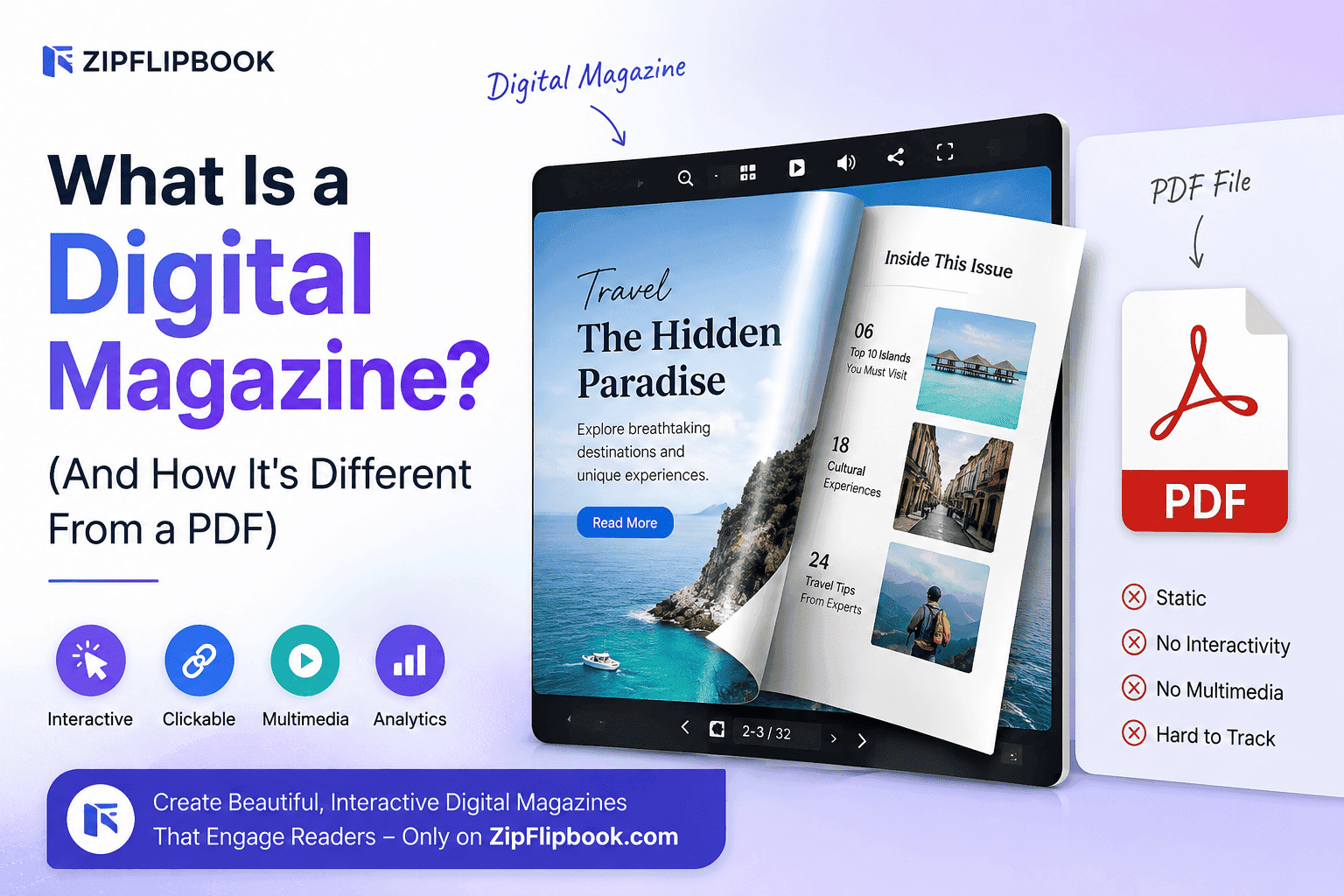
A PDF is a document. A digital magazine is an experience.
A PDF is a print file that got lost and ended up on your screen instead of the printer tray. It was built in 1993 to solve one problem: make sure a document looks the same on every computer it's opened on. That's it. That's the whole job. Adobe didn't design it to be read comfortably on a phone, to track who's actually looking at page 12, or to let a reader click straight through to a product page from an ad. It was built for a world where the end point was a laser printer, not a thumb scrolling on the subway.
A digital magazine is built for the screen from the ground up. Pages turn instead of scroll. Text reflows or at least resizes sensibly on mobile. Video plays inside the page instead of linking out to YouTube. Someone can click a "buy now" button on an ad and land on the product, not just admire a static image of it. The publisher, on the back end, can see which pages people actually spent time on and which ones got skipped in two seconds flat.
Same content, wildly different relationship with the reader.
Where the PDF actually falls apart
I'm not anti-PDF. It's a genuinely useful format for what it was built for — contracts, invoices, anything that needs to print identically on any machine. The trouble starts when people use it as a publishing format, because it was never one. It's a filing cabinet, not a storefront.
Here's where that print-era thinking actually breaks down:
Pinch-and-zoom hell. Most PDFs are laid out for an 8.5x11 page. Open that on a phone and you're either squinting at microscopic text or zooming in and panning across the page like a lost tourist. Anyone who's tried to read a restaurant's PDF menu on their phone at the table, thumb smudging the screen, knows this feeling intimately.
No idea what's working. A PDF gets downloaded and then it's a black box. You don't know if anyone opened it, how far they got, or whether they read page 3 and quit halfway through your feature article. You're publishing into a void and calling engagement numbers a "gut feeling."
Dead weight, dead links. Big PDFs are slow to load on mobile data, and once it's downloaded, it's a static snapshot — no live links that actually track clicks, no embedded video, no way to update a typo without re-sending the whole file to everyone who already has the old one sitting in their inbox.
No lead capture. If someone loves your magazine, a PDF gives you no way to grab their email or keep the conversation going. It's a brick wall. They read it, they close it, and unless they already knew how to find you, that's the end of the relationship.
Nothing to share. People don't forward PDFs the way they forward links. A flat file feels like homework. A page-turn magazine feels like something worth sending to a friend, because it actually looks like a magazine rather than an attachment someone has to download first.
None of this is a knock on whoever's still using PDFs for this — it's just what happens when a print-era format gets stretched to do a screen-era job.
Turn Your PDFs into Lead Generation Machines
Start getting highly-qualified leads from your PDFs and landing pages today. It takes exactly 2 minutes to set up.
No credit card required • Sign up in 10 seconds
What actually makes something a "digital magazine"
Strip away the marketing language and a real digital magazine usually has these things:
- A page-turn or scroll experience built for screens, not a rescaled print layout
- Mobile responsiveness that doesn't require zooming to read a single word
- Embedded media — video, audio, animated content — sitting directly in the page
- Clickable, trackable links on ads, calls to action, and references
- Analytics on views, time spent, and which pages people actually finish
- A way to capture reader interest — email signup, contact form, something that doesn't dead-end
That's the actual bar. Not "it's on the internet instead of on paper." A screensaver is on the internet too. A JPEG of a flyer is on the internet too. Being digital isn't the same as being designed for digital.
The real cost of the "good enough" format
Here's the thing nobody tells you when they hand over a PDF and call it a day: it's not that it fails outright, it's that it quietly underperforms in ways you never see because there's nothing measuring it. Your restaurant's seasonal menu gets opened once, squinted at, and closed. Your real estate brochure gets downloaded, and you have no idea if the buyer even scrolled past the first page before they lost interest. Your event program gets emailed out and you find out how many people actually read it exactly never.
That's the cost. Not a dramatic failure — a slow leak of attention you can't even measure, let alone fix.
Compare that to what happens when the exact same content lives in a format built for how people actually read on a screen. Pages turn with a flick instead of demanding a pinch-zoom-scroll routine. A "reserve a table" button on your menu actually takes someone to a reservation page instead of sitting there as inert text. You can look at a dashboard afterward and see that page four, the one with your seasonal specials, got double the engagement of page two — so maybe that's where the ad budget goes next quarter. None of that data exists in a PDF. It can't. The format wasn't built to collect it.
If you're a restaurant sending a seasonal menu, a real estate agent building a property brochure, or a hobbyist putting together a zine, the format you pick changes what happens after someone opens it. A PDF gets read once, if you're lucky, and then forgotten in a downloads folder. A proper digital magazine gets shared, because page-turn formats are just more fun to hand to someone else. It gets measured, because you can actually see what people did with it. And it gets acted on, because the links inside actually go somewhere clickable, not just sit there looking like a link.
Turn Your PDFs into Lead Generation Machines
Start getting highly-qualified leads from your PDFs and landing pages today. It takes exactly 2 minutes to set up.
No credit card required • Sign up in 10 seconds
Why I built ZipFlipbook
That's why I built ZipFlipbook. It takes your boring PDF and gives it a pulse. Suddenly, it's a flipbook that actually fits a phone screen. Links work. Video plays right inside the page instead of bouncing someone off to another tab. You get analytics so you know what people actually read — not a guess, an actual number — and you can even capture leads without sending them off to a separate landing page.
You already have the PDF. This just makes it useful.
It's free, it runs entirely in the browser, and you don't need to learn new software or hand it off to a designer for a week. Upload the PDF, and it comes out the other side as something people will actually want to flip through instead of something they close after five seconds.
If you've got a PDF calling itself a "digital magazine," take five minutes and see if you can spot the difference. I bet you will.
FAQ
Is a digital magazine just a PDF with a fancy page-turn animation on top? No, and this is the trap a lot of tools fall into — slapping a page-flip effect on a PDF viewer and calling it a day. The animation is the least important part. What actually matters is whether the thing is built for mobile screens, whether the links inside are clickable and trackable, whether video plays natively, and whether you can see any data on how people used it. A page-turn effect on top of a format that still doesn't resize for phones is lipstick on the same problem.
Can I turn a PDF I already have into a digital magazine, or do I need to redesign it from scratch? You don't need to redesign anything. That's the whole point of a tool like ZipFlipbook — you upload the PDF you already made in InDesign, Canva, Word, whatever, and it converts into a flipbook automatically. The design work you already did carries over; you're just changing what container it lives in.
Do digital magazines work for things that aren't magazines, like menus or brochures? Yes. "Digital magazine" is really shorthand for any long-form, page-based content that benefits from a page-turn reading experience and mobile-friendly layout. Restaurant menus, real estate brochures, event programs, product catalogs, zines, and reports all fit the same mold — anything that's currently a static PDF and gets read page by page.
Why does mobile responsiveness matter so much if my audience reads on a laptop anyway? Even audiences who mostly click through from a desktop email will have a meaningful chunk of mobile opens, and that number keeps climbing every year. A layout that forces zooming and horizontal scrolling on a phone doesn't just look bad — it actively pushes people to close the tab before they get past page one. You lose readers you never even know you had.
Is switching from PDFs to a digital magazine format expensive? Not with ZipFlipbook. It's free to use, works in the browser, and doesn't require hiring a developer or designer to make the switch. You're converting a file you already have, not starting a new project from scratch.
What kind of analytics can I actually see with a digital magazine? With ZipFlipbook, you can see things like total views, how far readers got into the document, and which pages held attention versus which ones got skipped. That's the kind of data a PDF simply can't give you, because nothing about a static file reports back on how it was read.