Every printed conference programme I've picked up was wrong by ten in the morning. The opening keynote overran by twenty minutes, one speaker missed a connection, and the projector in Room B gave up, so the workshop moved to the bar. By lunch the glossy schedule in your tote bag was a historical document.
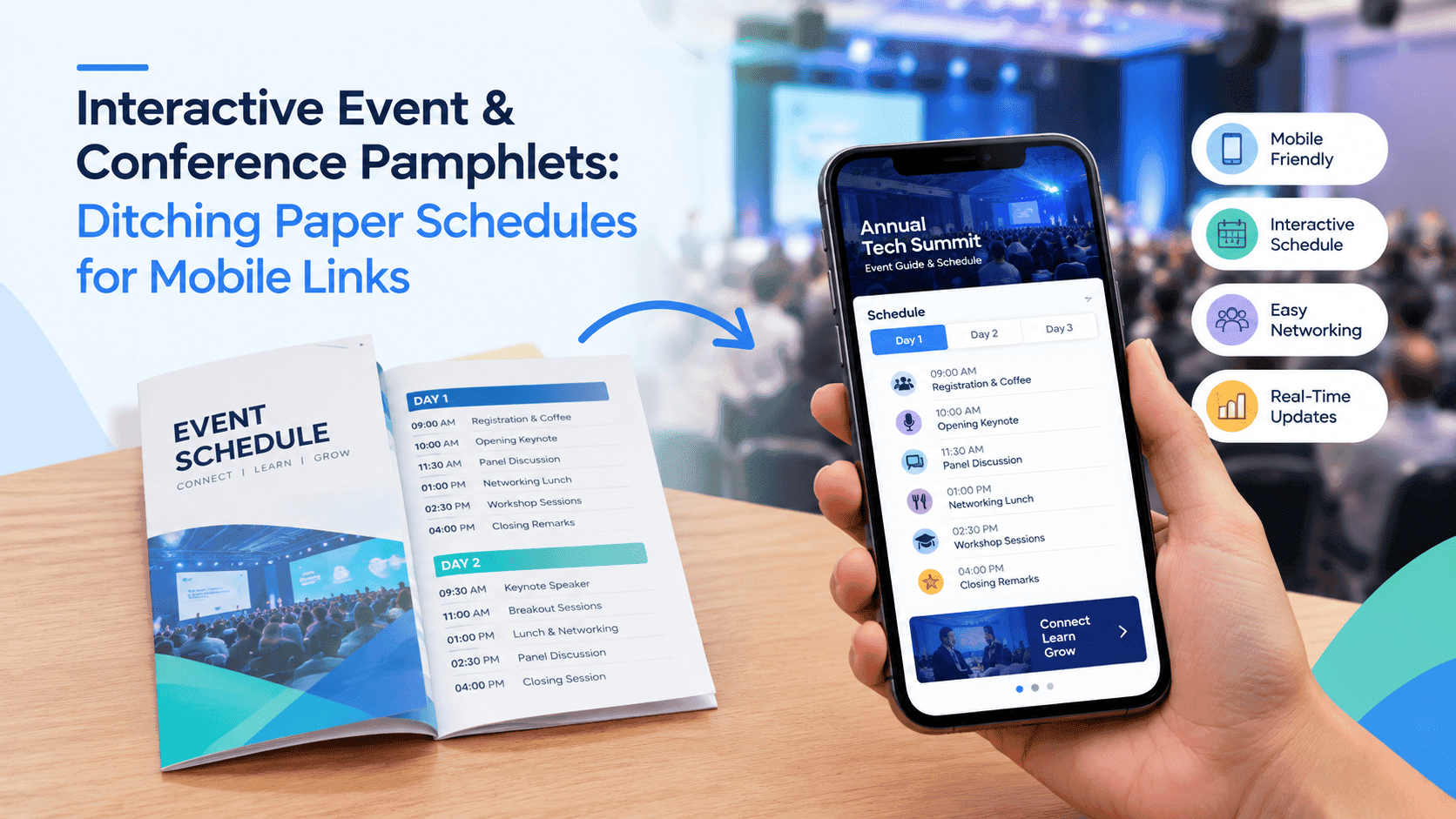
That is the whole case for an event pamphlet online. A link on a phone can be fixed at 9:40. A leaflet that went to the printer three weeks ago cannot. Attendees are holding their phones anyway, mostly to check email during the talks they find dull, so you may as well give them something worth opening.
Most organisers stop halfway. They export the schedule as a PDF, email it round and call it a digital conference guide. That beats paper, and it is still a miserable way to read a timetable on a six-inch screen. The better version lives at one link, loads quickly on a phone, and can be corrected mid-day without anyone downloading anything new.
Why an event pamphlet online beats the printed one
Cost is the obvious argument and the weakest. A 24-page A5 programme for 400 delegates runs to a few hundred pounds once you add design time and someone to collect the boxes. Organisers pay it cheerfully, because a printed programme makes the event feel real.
The stronger argument is change. Paper is frozen the moment it leaves the printer, and events are not frozen. Sessions merge. A sponsor wants a better slot. A speaker goes down with a cold and the panel loses a chair. Each of those means somebody at the registration desk saying "ignore page seven" about forty times an hour, which is a bad use of a volunteer.
Paper is also hard to use. Nobody finds the one workshop they care about in a three-column grid at 8:55 with a coffee in one hand and a lanyard tangled round the other. The print is small, it cannot be zoomed, and the leftover stack on day three is a pile of recycling that nobody wants to carry home.
An online pamphlet fixes most of that. People tap a session instead of hunting for it. The text enlarges for anyone who needs it. Late registrants, remote attendees and the speaker's colleagues who couldn't make it all get the same version as everyone else. And you can see whether anyone opened it, which no printing company will ever tell you about a box of programmes.
There is a catch. Digital only works if people can open it in a few seconds on whatever phone and signal they have. That is where most attempts fall over.
A digital conference guide PDF is a start, and a weak one
Search for a digital conference guide PDF and you'll find hundreds of them: the programme exported from Canva or InDesign, full-bleed speaker photos, a 45MB file attached to a confirmation email. It looks lovely on the designer's 27-inch monitor.
On a phone in a hotel lobby it is a different story. The file takes ages to download over a shared conference wifi that was never built for 400 people at once. When it does open, the viewer shows a tiny A4 page and the reader spends the next minute pinching, panning and losing their place. Links inside the PDF often stop working after export, or open in a way that dumps you out of the document with no easy route back.
Versions are the worst part. You send the guide on Monday. On Wednesday a session moves, so you send version two. Now half your delegates have the old one saved in their downloads, and you have created the exact problem paper had, only with a more confident file name.
Attachments also vanish. Email clients bury them, and people who read the message on a train have no idea where the file went on arrival day. Most of the chatter about an event happens in WhatsApp groups and Slack channels, where big files are a chore to share. Large files are a chore in those chats, as the notes on sending a big brochure over WhatsApp without a 30MB attachment show, and a conference guide has the same weight problem.
Keep the PDF as your source file, and hand attendees something else.
Turn Your PDFs into Lead Generation Machines
Start getting highly-qualified leads from your PDFs and landing pages today. It takes exactly 2 minutes to set up.
No credit card required • Sign up in 10 seconds
Turning the PDF into a link people open on their phones
Build the guide for a phone from the start. Portrait pages, one day or one track per page, body text big enough to read at arm's length without zooming. If you design on a laptop, shrink the preview to roughly the size of a phone screen before you sign anything off. Text that looks fine at 100% is often unreadable at that size.
Keep the text live. Exporting every page as a flattened image shrinks nothing and kills search, so nobody can type a speaker's name and jump to the right session. Compress the photos instead. Aim for a finished file under 15MB, and under 10MB if you can stand it. Speaker headshots rarely need to be bigger than a few hundred pixels across.
Then put the PDF somewhere that turns it into a page-turning view with its own address. That is the job ZipFlipbook does, and it's why I built it: upload the PDF, get a flipbook with a link you can embed on the event site or send round. It's free. The link stays the same for everyone, so there is only ever one version in circulation.
A few things are worth adding at this stage because they only take minutes:
- A contents page on page two with each day and track linked to its page.
- A tappable link from every session to the speaker's bio or the sign-up page for workshops with limited places.
- Embedded video where it helps. A 40-second intro from the keynote speaker does more than a paragraph of biography,, and a sponsor clip fits the same slot.
- The wifi name and password, the venue address and the emergency contact on the first page, not hidden on page nineteen.
Test it before anyone else sees it. Open the link on a mid-range Android phone on mobile data, not your own flagship on office fibre. Count how many seconds pass before the first page shows. If you are past five, go back and shrink the images.
What goes in an interactive festival pamphlet
A conference is a timetable with coffee. A festival is a timetable with weather, mud and a thousand people who all want the same toilets at the same moment. The pamphlet has more work to do, and it has to do it outdoors.
Start with the set times, and lay them out by stage and day so someone standing at the main stage can see what comes next without scrolling through the whole weekend. Clashes are the thing festival-goers care about most. If two bands you love overlap, you want to see that straight away, so keep the grid tight and put start times in bold.
The map matters more than any single page. Make it a full-page image people can zoom into, with the things they hunt for marked clearly: water points, first aid, the lost-child point, cash machines, the last bus pickup. Put the contact number for stewards next to the map, not on a separate page they have to remember exists.
Link out where it's useful. Each act can link to a short video or a streaming page. Food traders can link to their menus. Camping-field rules, the code of conduct and refund policy can sit at the back and be easy to reach. The interactive bits are what make this an interactive festival pamphlet and not a PDF with a nice cover.
Signal is the awkward bit. Fields are bad for it, and a flipbook that needs to fetch every page is only as good as the connection. Tell people to open the link at the gate or the campsite, where there's usually wifi or at least a bar of 4G, and leave the tab open. Offer a download of the PDF for anyone who wants a saved copy. And test the link at the far end of the site, not by the production office, because that's where signal is weakest.
Print a one-sheet map and set-time card as well. A few thousand of those cost almost nothing next to a full programme, and they cover the person whose phone dies at four in the afternoon.
Turn Your PDFs into Lead Generation Machines
Start getting highly-qualified leads from your PDFs and landing pages today. It takes exactly 2 minutes to set up.
No credit card required • Sign up in 10 seconds
Getting the link into people's hands
A brilliant guide that nobody opens is a very expensive PDF. Distribution is where the work shifts from design to logistics.
The QR code does most of the lifting. Print it on the back of the badge, on the lanyard card, on the registration banner, on the sign at the entrance and on the table at every session room door. Put it on the stage screens between talks as well, big enough to scan from the back row. Pubs and cafes worked this out first with QR menus on table cards, and the rules carry straight over: print it at eye height, on matt stock so the lights don't glare off it, and make it at least 3cm square. Scan it yourself from a metre and a half away before the print run.
Use a short link as well, something a person can type from memory or read out. yourevent.com/guide is far easier to shout across a registration queue than a string of random characters.
Send the link three times. A week before, in the "what to expect" email. The evening before, with the weather and the parking notes. And on the morning itself, by whichever channel people read: the event WhatsApp group, the Slack workspace, an SMS from the registration system. The morning message is the one that gets opened, so keep it to a line and the link.
If the event has a website, embed the guide on a page there too, so the schedule sits in the same place as the ticket information and nobody has to wonder which link is the current one. The same applies to the speaker pages on your site: link each one to the right page of the guide.
Don't gate the schedule behind a form. It's tempting, since you want the email addresses, but people trying to find a room at 8:55 will not fill in a lead form to learn where their session is. Save the gating for something people choose to want, like the sponsor brochure or the slide decks after the event.
Changing things mid-event, and reading the numbers
This is the payoff for all the effort. When the 11:00 session moves from Room B to the main hall, you change the source file, re-export, swap it in and the same link shows the new version. Check before the event that whatever tool you use keeps the link unchanged when you replace the file. If it hands you a new address every time, you're back to two versions floating around.
Put a visible "Updated 10:15, Friday" line on the cover. It sounds trivial, and it saves you from a delegate waving a stale screenshot at you and insisting the talk is in Room B. Then say it out loud: a line from the stage and a message in the group chat telling people to refresh the guide. Digital changes only work if people know there's been one.
Afterwards, look at the numbers. How many people opened the guide on day one compared with day two? Which pages did they reach? If most readers stop before the afternoon workshops, those workshops are buried and you've found a design problem for next year. If the sponsor page got a few hundred views and the sponsor is asking what they got for their money, you have an answer that a box of printed programmes could never give. The sponsor's clip, the clicks on their link and the pages people stopped on all go in the follow-up email.
If your guide is still a plain PDF, there are free ways to see whether anyone opened it, though you won't get page-level detail from most of them.
Clicks on speaker links show which talks people wanted more from, which is a fair argument for a longer slot next year.
Mistakes I keep seeing
The big one is designing for the laptop. The organiser builds the guide on a wide monitor, approves it on the same monitor, and nobody opens it on a phone until the morning of the event. By then the text is too small, the map is a blur and there's no time left to rebuild anything.
The second is a heavy file. Fifty megabytes of photography feels generous right up to the moment a delegate on roaming data waits ninety seconds for page one. Cut the images down before you export and the guide feels twice as quick.
Then there is the missing date stamp. Without one, nobody can tell which version they're looking at, and your volunteers lose half the morning arguing about it.
Some organisers bury the useful stuff. Wifi password, first aid, the shuttle times and the emergency number belong on page one or two. People who are lost, hungry or worried won't flip through a twenty-page guide to find them.
A few forget the people who prefer paper. Ditching printed schedules doesn't mean banning them. Keep a small stack at the desk for delegates who ask, and for anyone with accessibility needs that a phone doesn't meet. Fifty copies is plenty, and it removes the one real objection you'll hear from the committee.
And plenty of teams treat the guide as finished the day it goes live. The version you publish on Monday is a first draft of the version people will need on Thursday. Plan who owns the edits, how fast they can turn them round, and who tells the speakers.
FAQ
How do I make an event pamphlet online?
Export your schedule as a PDF, upload it to a flipbook tool such as ZipFlipbook, and share the link and a QR code. For a one-day event it takes under an hour once the schedule is final.
What is a digital conference guide PDF?
It's the printed programme as a file, usually emailed or downloaded. It works, but it's slow on phones and hard to update, so turn it into a link instead of attaching it.
How big should a digital conference guide PDF be?
Keep it under 15MB, and under 10MB if you can. Anything over 30MB will crawl on conference wifi and is a pain to send in group chats.
Can I make an interactive festival pamphlet for free?
Yes. Design it in Canva, Word or InDesign, export a PDF, and upload it to a free flipbook maker. Add links to artists, menus and the map, then test it on a phone before the gates open.
Do attendees need an app?
No. They scan the QR code with the phone camera and the guide opens in the browser. That's the main reason I'd choose a link over a dedicated event app for anything under a few thousand people.
Should I still print anything?
A one-sheet map and set-time card, plus a small stack of full programmes for anyone who asks. Skip the big print run.
Turn Your PDFs into Lead Generation Machines
Start getting highly-qualified leads from your PDFs and landing pages today. It takes exactly 2 minutes to set up.
No credit card required • Sign up in 10 seconds
Conclusion
Switching to an event pamphlet online won't make your event run on time. It will stop the printed schedule from lying to people while it runs late. Build the guide for phones, keep the file small, put it behind one link and one QR code, and decide before the doors open who is allowed to change it.
For a conference, that's a clean contents page and a visible update stamp. For a festival, it's the map, the clash grid and a printed backup for the flat battery. In both cases the first time a session moves and everybody knows within minutes, you'll wonder why you ever sent a box to the printer.