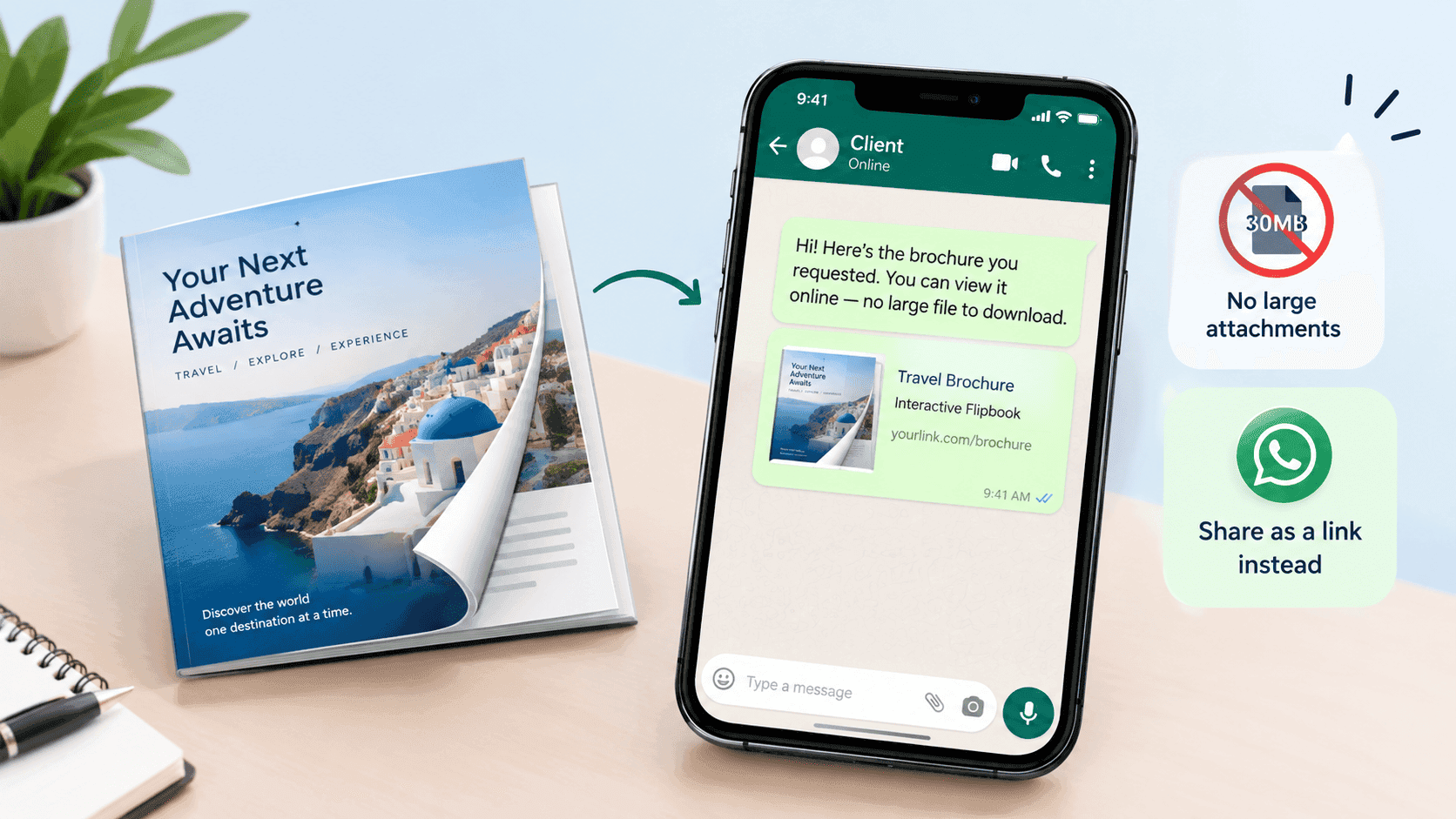
You finish the brochure on a Friday afternoon. Twelve pages, good photos, and the designer exported it at print quality, so the file comes out at 31MB. A customer messages you on WhatsApp asking for details. You attach the PDF, hit send, and the little clock icon sits there for a minute. On their end it's worse. They see a grey file icon with 31 MB next to it, they're on a bus with two bars of signal, and they leave it for later. Later doesn't come.
If you want to send a brochure on WhatsApp without it arriving as a 30MB attachment, you have two options. Shrink the PDF until it stops being annoying, or stop sending the file and send a link to it. I'd pick the link almost every time. The shrinking route is still worth knowing, because a bloated PDF causes the same grief in email, Slack and everywhere else you try to send it, so both are covered below.
Why a brochure PDF gets so heavy
Designers export for print. That means photos at 300 dpi, bleed and crop marks, full font families embedded, and sometimes transparency effects that were flattened badly on export. A phone screen needs a fraction of that. A twelve-page brochure with decent photography can land anywhere between 20MB and 60MB without anyone having done anything wrong.
WhatsApp itself will take big files. Documents can go up to 2GB, so the app is not what stops you. The recipient is. Photos get compressed when you send them, but a PDF goes as a document, and a document arrives at full size. Depending on their auto-download settings, it often won't download on mobile data at all until they tap it. Then they wait for the download, then the phone picks a viewer, and on some Android handsets that viewer takes a few more seconds to open a file that big.
Every one of those steps loses a few people. The customer who asked for your brochure at 6pm on a Friday is the customer least likely to wait for it.
A PDF in a chat is also a dead end. You can't fix a typo in it after sending. If prices change in March, the old copy keeps floating around in forwarded messages. And you have no idea whether anyone opened it, because the blue ticks only tell you they saw the message, not the file.
Shrinking the PDF first
Almost all of the weight is images. Text costs next to nothing. So the job is to downsample the photos from print resolution to screen resolution, which usually means around 150 dpi, and to throw away anything the phone doesn't need.
A few ways to do it, roughly from least to most effort:
In Acrobat, use File, Save as Other, Reduced Size PDF. If you want control, Optimize PDF lets you set the image resolution yourself. This is the one I'd use for a brochure with real photography because you can see what you're giving up.
On a Mac, Preview has a Reduce File Size filter under Export. It works, and it also mashes images into a blotchy mess more often than not. Fine for a text-heavy price list. Bad for a brochure where the photos sell the product.
If you're comfortable in a terminal, Ghostscript does it in one line: gs -sDEVICE=pdfwrite -dPDFSETTINGS=/ebook -dNOPAUSE -dQUIET -dBATCH -sOutputFile=small.pdf input.pdf. The /ebook setting targets 150 dpi. The /screen setting goes down to 72 dpi, which is too low for anything with fine detail.
The cleanest fix is going back to the source file and exporting again. InDesign has a Smallest File Size preset, and in Canva you want the standard PDF download rather than the print one. Exporting once at the right setting beats compressing an already compressed file, which is how you end up with fuzzy logos.
Online compressors work too. Just remember you're uploading your customer-facing price list to a site you know nothing about, so skim the privacy page before you do it with anything sensitive.
Aim for under 5MB, and 2 to 3MB if you can manage it. Then open the result on your phone, not your monitor, and look at a photo page at normal zoom. If the images look soft, go back up a notch. The same image settings matter if the PDF is headed for a flipbook, and optimizing large PDFs for fast online flipbooks goes through the numbers in more detail.
Estate agents feel this one hardest, because every listing is a photo-heavy PDF and half their enquiries arrive on WhatsApp. Compressing and sharing property brochures covers that case if you're in that world.
Why a link beats even a small PDF
A 3MB PDF is acceptable. A link is better, and the reasons add up.
A link is a few dozen characters. It sends instantly, even on a bad connection. WhatsApp turns it into a preview card with a title, a line of description and a picture, so the message looks like something worth tapping instead of a grey document icon. The customer taps it, the brochure opens in their phone's browser, and the first page shows up while the rest loads as they flip. Nobody waits for 31MB to arrive before seeing page one.
You also get to change the brochure without resending it. Fix the typo, update the pricing, swap the cover, and every old message with that link now points at the current version. For a trades business or a small shop that sends the same brochure fifty times a month, that alone is worth the switch.
And you get information back. A PDF sent as a file tells you nothing. A link can tell you whether it was opened, how many pages were read and where people stopped, which I'll come back to further down.
Turning the PDF into a link
This is the part that takes about two minutes with ZipFlipbook. Upload the PDF at zipflipbook.com, wait for it to convert into a page-turning version, and copy the link it gives you. That's it. It's free, it runs in the browser, and the person on the other end doesn't need an app or an account.
There's a lead capture option that asks the reader for a name or email before they get in. For a cold audience, such as a brochure linked from an ad or a post, that can make sense. For a message to someone who has just asked you a question on WhatsApp, I'd leave it off. They already gave you their number. Putting a form in front of a brochure they asked for feels like a toll booth, and some of them will just walk away.
One more thing before you send it. Open the link on your own phone, on mobile data rather than Wi-Fi if you can, and flip through the whole thing. Check that the text is readable without pinching and that the pages turn without a stutter. It takes a minute and it's the check people skip.
Turn Your PDFs into Lead Generation Machines
Start getting highly-qualified leads from your PDFs and landing pages today. It takes exactly 2 minutes to set up.
No credit card required • Sign up in 10 seconds
Making the link look right in the chat
WhatsApp builds its preview from the page's title, description and image, so what you see in the preview is what your customer sees. Before you send it to a client, message it to yourself, or make a group with just you in it, and look at the card. If the title is a file name like final_v3_BROCHURE, rename it before you share.
Preview images are cached, sometimes for a while. If you change the cover after you've already shared a link, the old picture can keep showing up in new chats for a day or two. Better to get the cover right before the first send.
Then write a proper message around the link. A bare URL from a business looks like spam. One line of context fixes that: something like “Here's the brochure, pricing is on page 9 and the install timeline is on page 11.” Telling people where the thing they asked about lives saves them flipping through twelve pages, and it shows you read their question.
Resist the urge to send three separate messages with the brochure, the price list and the terms. People open the first one and ignore the rest. Put it all in one document and send one link.
WhatsApp Business tricks that make this faster
If you use the WhatsApp Business app, save the message with the link as a quick reply. Type the shortcut, the whole message appears, and you've answered the enquiry in four seconds. Most small businesses send the same two or three documents all week, so this saves more time than any other change on this list.
Labels are worth a look too. Tag people who've received the brochure, so a week later you can filter the list and follow up with the ones who went quiet.
WhatsApp Business also has a built-in catalogue, and it's good for a short list of products with photos and prices. If you sell twenty items, use it. If you sell services, or a range with a lot of explanation, or anything where the story matters, a brochure does the job better, and the link sits nicely next to the catalogue rather than replacing it.
Broadcast lists are handy for sending to a lot of people at once, but they only reach people who have saved your number in their contacts. Don't expect it to work on strangers. And don't blast a brochure at your whole list without asking, because WhatsApp is an awkward place to get reported.
Finding out whether anyone opened it
This is where the link earns its place for good. Once the brochure is a page rather than an attachment, you can see views. How many people opened it, which pages they read, how long they stayed. Tracking PDF opens for free goes through the setup if you want the detail.
It changes how you follow up. If a customer opened the brochure three times and got to the pricing page, a message the next morning makes sense. If they never opened it, resending the same link with a different one-line hook is better than calling. If they stopped at page 4 every time, page 5 probably has a problem and you can fix it once for everyone.
None of that is possible with a file. The blue ticks tell you the message was seen and nothing else.
Mistakes I'd avoid
Compressing too hard. A 700KB brochure that looks like it was photographed through a wet window is worse than a 4MB one that looks sharp. Always check the result on a phone.
Sending a Google Drive link set to restricted. The customer taps it and lands on a Request access screen, which is the fastest way to lose a sale you'd already half won. If you use Drive, set it to anyone with the link and test it from a different account.
Using a file transfer link that expires. WeTransfer links die after a week or so, and people come back to old WhatsApp chats weeks later looking for the brochure. A permanent link doesn't have that problem.
Forgetting that people forward things. Your brochure link will end up in a group chat you've never heard of. That's fine, as long as the link still works and still shows the current version.
Sending the print PDF to the printer and the screen PDF to everyone else, then mixing them up. Name the files clearly. It sounds silly until you've sent the 60MB one by mistake.
When a plain PDF is still fine
Not everything needs a flipbook. A one-page quote or invoice that the customer needs to save, sign or forward to their accountant is better as a normal PDF, and it's usually small anyway. The brochure case is different: it's long, it's visual, it's something you want people to browse and not file away. That's where the link wins.
The rule I use is simple. If they need to keep it, send the file. If they need to read it, send the link.
Turn Your PDFs into Lead Generation Machines
Start getting highly-qualified leads from your PDFs and landing pages today. It takes exactly 2 minutes to set up.
No credit card required • Sign up in 10 seconds
FAQ
What is the maximum PDF size you can send on WhatsApp?
2GB per document. That's a limit you'll never hit with a brochure and a good reason not to treat it as a target, since anything beyond a few MB is slow for the person receiving it.
How do I compress a PDF for WhatsApp?
Downsample the images to about 150 dpi in Acrobat, with Ghostscript's /ebook setting, or by re-exporting from your design tool with a small-file preset. Get it under 5MB and check it on a phone.
Can I send a brochure on WhatsApp without losing image quality?
Yes, by sending a link. The flipbook loads pages at screen quality as the reader goes, so you aren't squeezing the file down to fit the chat.
Is it better to send a PDF or a link on WhatsApp?
A link for brochures and catalogues, a PDF for anything the customer has to save or sign. A link also lets you update the content and see who opened it.
Does the person need an app to open a flipbook link?
No. It opens in the phone's browser like any web page.
Next time someone asks you for the brochure on WhatsApp, upload it once, save the link as a quick reply, and send that. The 31MB file stays on your computer where it belongs.