I have stood at a lot of pub tables with my phone out, watching a QR menu load one grey rectangle at a time. The code scanned fine. The page took most of a minute. When it finally arrived it was a PDF built for A4 paper, so I pinched, zoomed, dragged sideways, lost my place, and ended up ordering whatever I could still see on screen.
I see this in most QR menus I scan. The owner did the hard bit, which was ditching the sticky laminated cards, and then stopped one step short. A QR code is only a doorway. What sits behind it decides whether people order another round or wave down a member of staff to ask what's on.
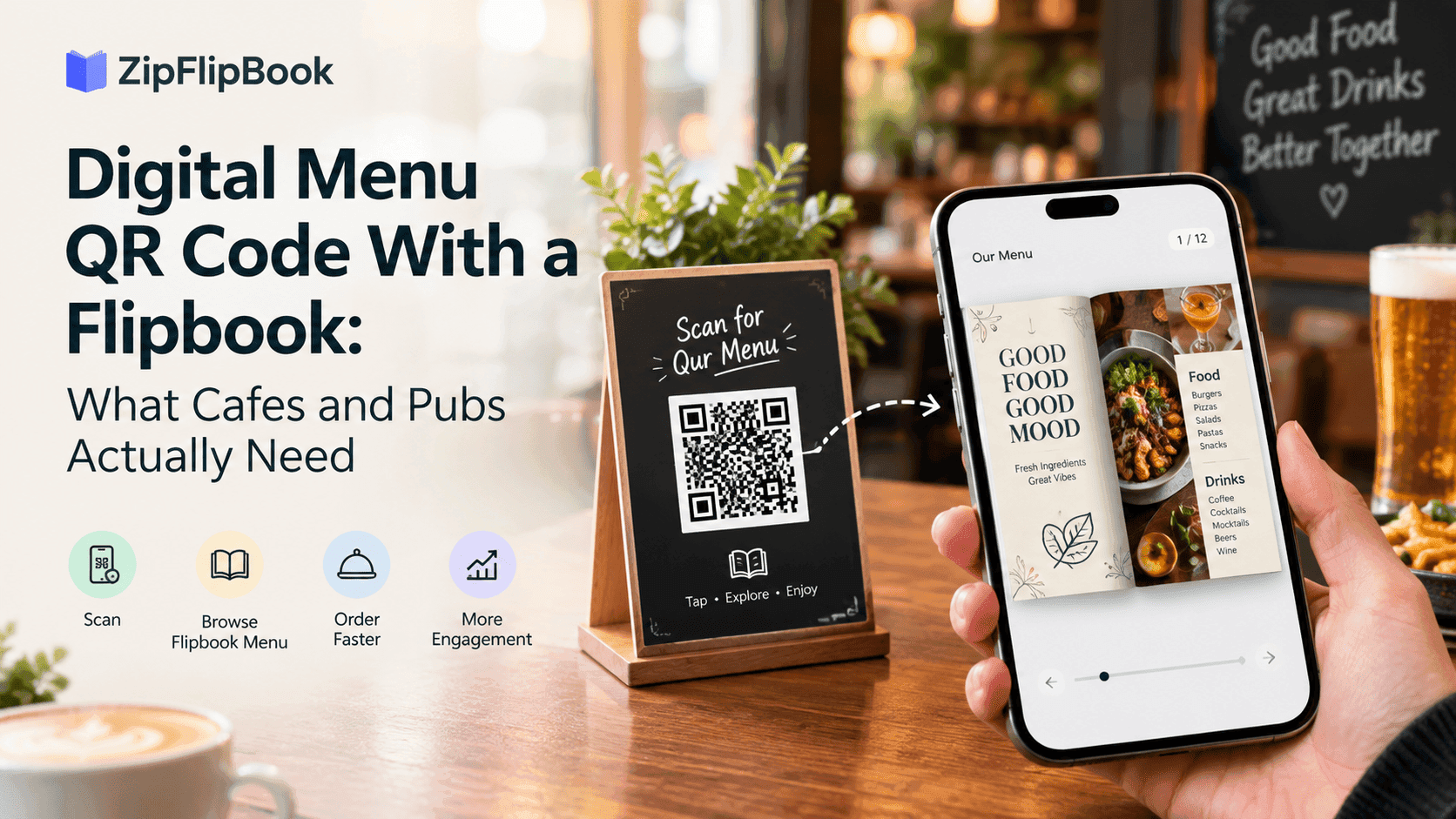
Here's the version that works: a QR code that opens a flipbook menu, meaning your existing PDF turned into a phone-friendly, page-turning document. No app to install, no developer, and it costs next to nothing.
Turn Your PDFs into Lead Generation Machines
Start getting highly-qualified leads from your PDFs and landing pages today. It takes exactly 2 minutes to set up.
No credit card required • Sign up in 10 seconds
Why a plain PDF link lets you down
Most cafes and pubs start the same way. Someone exports the menu from Canva or Word, uploads the file to the website, and pastes the link into a free QR generator. Job done, apparently.
Then the actual room gets involved. Pub wifi is either a password on a chalkboard nobody can read or it doesn't exist, so half your customers are on mobile data, and the cellar bar gets one bar of signal if you're lucky. A menu PDF full of photos can easily hit 15MB. On a patchy connection that's a long wait, and a long wait in a cafe queue means the person behind you has already settled on a flat white and couldn't care less about your brunch page.
Then there's the layout. A page designed for paper is wrong for a phone. The text is tiny, so people zoom, and once they've zoomed they lose the page and end up scrolling around like they're reading a map. Some phones don't even open the PDF in the browser. They download it into a folder the customer will never look in again, which is the digital equivalent of handing someone a menu and snatching it back.
Customers won't blame you for it, and they won't mention it either. They'll just order the first thing they recognise, or the cheapest thing, or nothing extra.
What a flipbook menu changes
A flipbook loads the first page quickly and fetches the rest as you turn through. That alone removes most of the waiting. It also fixes orientation: cover, starters, mains, puddings, drinks. People already know how to move through a menu because they've been doing it their whole lives. Swipe, next page, next page.
A flipbook also does things a static PDF can't. Links become tappable, so "book a table" or "order for collection" actually works. You can drop a short video of the sizzling fajitas onto the mains page. And you can see which pages people open, which I'll come back to, because it's the bit most owners never think about.
Not every menu needs a flipbook, though. If your cafe menu is one side of A4 with eleven items on it, a well-made single page is fine and I wouldn't overcomplicate it. But a pub with food, a drinks list, specials, a kids' menu, a Sunday roast and an allergen page has enough going on to justify pages. That's the case I built ZipFlipbook for: you upload the PDF you already have and it becomes a flipbook in your browser, free, without a designer in the loop. If you want the wider argument for menus that behave more like something you'd hold, I covered it in interactive brochures for restaurants and menus.
Fix the PDF before you upload it
A flipbook is only as good as the file you feed it, and menu PDFs are usually a mess in ways that don't show up on a laptop.
Start with size. Photos are the usual culprit: someone drops in a 6MB picture of a burger and the whole file balloons. Compress the images and aim for a few megabytes in total. I wrote a full piece on optimising large PDFs for fast online flipbooks, and all of it applies to menus twice over, because your readers are standing up, hungry, on mobile data.
Then type. Body text needs to be readable on a phone without zooming, which in practice means bigger than you think. Use dark text on a plain light background. Pubs are dim and beer gardens are bright, and the elegant low-contrast greys that looked lovely on the designer's monitor turn to mush in both. Keep the words as real text rather than baked into an image, so the file stays light and the letters stay sharp.
Think about page order as well. Put first what most people come for. If eight in ten of your customers want a pint, lead with drinks. If your cafe lives on breakfast, open with breakfast and let the cakes sit behind it. You know your regulars better than any template does.
Allergens deserve their own mention. In the UK you need to be able to tell customers about the 14 major allergens, and a page in the menu can carry that information, but a QR code alone isn't the whole answer. Someone without a phone or signal still has to be able to ask a member of staff and get a straight reply. Check the exact requirements with your local council's environmental health team rather than taking my word for it, because I'm no lawyer.
Turn Your PDFs into Lead Generation Machines
Start getting highly-qualified leads from your PDFs and landing pages today. It takes exactly 2 minutes to set up.
No credit card required • Sign up in 10 seconds
Make the QR code the right way
Upload the PDF to your flipbook tool and you get a link to the finished menu. Now the QR code, and this is the step where owners quietly set up a future headache.
Most free QR generators create a static code, which bakes the exact web address into the pattern. If that address ever changes, say you switch tools or redesign the site, every code you've printed is dead. Forty table stickers and a poster by the door, all pointing nowhere.
Point the QR code at an address you control instead, something like yourpub.co.uk/menu, and have that address redirect to the flipbook. Your web person or your website builder's redirect settings can sort it in five minutes. A dynamic QR service that lets you change the destination later also works, though check the pricing carefully, because some stop working when a free trial ends, which is a horrible surprise on a Saturday night. Either way you print once and edit forever.
Before printing anything, test it properly. Borrow the oldest phone you can find, switch off wifi, and scan the code on mobile data. If the menu appears within a few seconds and you can read it without zooming, you're good. If not, go back to the file size. Test it in the actual room too, because the signal in the corner booth can be nothing like the signal at the bar.
Printing and placement
Print the code at least 3cm square, and bigger is kinder. Keep the contrast strong. Black on white beats brand orange with a logo the size of a fifty-pence piece in the middle, because plenty of older cameras choke on fancy codes.
The finish matters more than most owners expect. Glossy laminate reflects the ceiling spotlights and makes the code unreadable from certain angles, so go matt. A beer mat is a poor home for one, for reasons that become obvious the first time somebody spills a pint. A small table stand parked next to the ketchup, or a sticker on a wipeable surface away from the wet zone, works far better.
Put a short line beside the code. "Scan for our menu" is plenty, with the short web address in small type underneath for people whose camera won't cooperate. Keep a few paper menus behind the bar too. Some customers don't want their phone out at dinner and some don't have one that works, and a menu that shuts them out is a bad menu however clever it is.
A second code at the bar or counter is worth having. It shortens the queue, because people reach the front already knowing what they want.
Keep it current, because stale menus cost trust
A digital menu is easy to change, which is the advantage. The risk is that easy turns into never. Nothing annoys a customer more than choosing the pie, waiting twenty minutes, and being told it came off the board at lunchtime. A mulled wine still sitting on the drinks page in March runs it close.
Build a small habit: check the menu on the first of every month, and any time prices or dishes change. Put a "last updated" date on the first page so staff and customers both know it's fresh. For things that shift weekly, like specials, give them a single dedicated page or a separate short document, so you're not re-exporting the whole menu because the soup changed.
When you swap in a new PDF, check whether your tool keeps the same link. If it doesn't, update your redirect and the printed codes carry on working, which is the whole point of setting it up that way.
Turn Your PDFs into Lead Generation Machines
Start getting highly-qualified leads from your PDFs and landing pages today. It takes exactly 2 minutes to set up.
No credit card required • Sign up in 10 seconds
Use the numbers, but don't gate the menu
A plain PDF leaves you guessing. A flipbook shows you how many people opened the menu, when, and which pages they reached. That tells you things. If half your viewers never get past page two, that page is probably a wall of text. If the drinks page gets hammered on Friday evenings, your best-margin cocktails belong on it. If nobody opens the kids' menu, either you don't get many families or nobody can find it.
I've written about how to track PDF opens for free, and the same idea works here on a smaller and more human scale.
I wouldn't lock the menu behind an email form. Lead capture is genuinely useful, and ZipFlipbook has it, but nobody wants to hand over their address just to find out what chips cost. A closing page works better: offer weekly specials and quiz night dates by email, for the people who actually want them. A cafe can offer a loyalty freebie the same way. Ask after they've seen the menu, never before.
Put the link where people look before they arrive
Your QR code lives on tables, but the menu link should live everywhere else too. Add it to your Google Business Profile, your Instagram bio and your website's homepage. People check the menu before deciding where to eat, and a link that loads fast and reads well on a phone beats a blurry photo of a menu somebody uploaded to Facebook in 2022.
Turn Your PDFs into Lead Generation Machines
Start getting highly-qualified leads from your PDFs and landing pages today. It takes exactly 2 minutes to set up.
No credit card required • Sign up in 10 seconds
Before you print the stickers
A QR menu doesn't need to be clever. It needs to get words in front of hungry people quickly, in a form they can read with one thumb. Most failures I've seen aren't the code's fault. They're a heavy file, tiny text, a dead link, or a menu nobody has touched since March.
Fix those four and you're ahead of most pubs in the country. If you already have a menu PDF, you can turn it into a flipbook at zipflipbook.com in a few minutes and see how it feels on your own phone. Scan it standing at the back of your own pub, and if you wouldn't enjoy using it, you'll know exactly what to change.