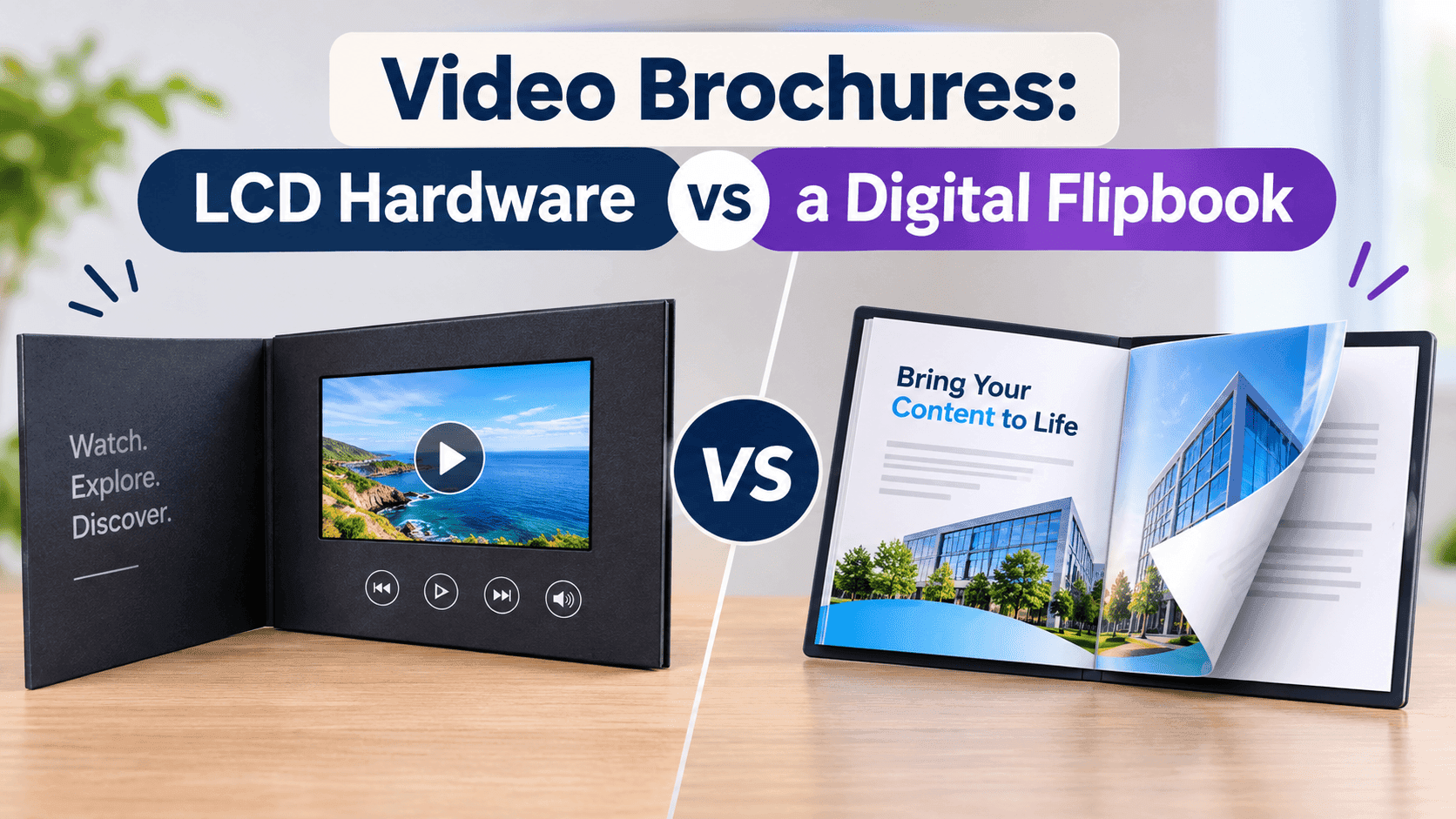
A video brochure is a printed piece that plays video. That's the whole definition, and it covers two very different products. One is a card or folder with a small LCD screen, a battery and a speaker glued inside it. The other is a PDF turned into a flipbook with video embedded on the pages, opened by a link or a QR code. Both get called video brochures, both show up in the same Google results, and the quotes you get for them differ by a factor of fifty.
I build ZipFlipbook, so I lean toward the flipbook. But the LCD card wins in some cases, and I'll get to those.
What an LCD video brochure is
Picture a thick greeting card. Open the cover and there's a screen set into the right-hand panel, usually 4.3, 5 or 7 inches, with a small speaker behind it and a thin rechargeable lithium battery under the paper. A magnetic switch starts the video when you open the cover and stops it when you close it. Some have a button for pause and volume. The video lives on built-in flash memory, which is why it plays with no Wi-Fi, no phone and no sign-in.
They're sold as video-in-print mailers, video cards and video books, and the pitch is tactile. Someone gets a box in the post, opens it, and a screen lights up in their hands. Nobody mistakes it for junk mail. It feels like a gift, and recipients keep them on desks for weeks, which no PDF has ever managed.
Then you get the quote. Prices vary by screen size, memory, print finish and order volume, and a typical figure per unit lands somewhere between about eight dollars at the cheap end and thirty or more for a rigid-box version with a 7-inch screen. Minimum orders usually begin around 500 units from the bigger manufacturers, and a few will do 100 at a much worse unit price. Lead time is rarely under three weeks, and four to six is more common once you add sample approval and shipping from the factory, which is mostly in Shenzhen.
The video itself is a problem too. Once the file is loaded onto the chip, it's loaded. If you spot a wrong phone number in the closing slide after the units are assembled, you have a box of expensive mistakes. Some suppliers let you reflash over USB, but nobody is going to do that for 800 cards on a recipient's desk in another country.
What a digital flipbook version looks like
A flipbook video brochure starts as a normal PDF. You export your brochure from Canva, InDesign, Word or whatever you used, upload it, and get an interactive page-turning version with a shareable link. Video goes onto specific pages: a product demo on page four, a founder walkthrough on the cover, a customer testimonial beside the pricing table. The viewer clicks play inside the page. There's nothing to charge, no unit to ship, and nothing to open besides a browser.
You can embed video from YouTube or Vimeo, or upload your own file, and ZipFlipbook's step-by-step for that is in our post on how to embed video in a digital brochure. The point worth making here is that the video isn't locked in. Replace the file next Tuesday and every existing link shows the new version.
The brochure can sit behind a lead capture form, so the video is the reward for leaving an email address. It can also be embedded on your site, dropped into an email, or printed as a QR code on anything you like. That last use matters more than it sounds, and I'll come back to it.
Cost, side by side
People underestimate the money gap. The numbers:
An LCD card costs roughly $8 to $30+ per recipient, with minimums of 100 to 500 and a lead time of three to six weeks. A flipbook costs effectively nothing per recipient, has no minimum and goes out the same day. Once the cards are made, the video can't be edited unless the supplier supports reflashing, while a flipbook takes a new file instantly. The card works offline and the flipbook needs a connection. The card tells you nothing about who watched; the flipbook reports opens, page views, video watch behaviour and leads. The card ships as a parcel and lithium batteries complicate air freight, while the flipbook ships as a link. Playback on the card runs out after 5 to 30 minutes of battery, and the flipbook has no limit. The card does feel like a gift, though, and the flipbook doesn't.
A 500-unit run at twelve dollars each is six thousand dollars before postage. If your conversion from a mailed box to a booked meeting is good, that can be an excellent return. If you don't know your conversion rate yet, six thousand dollars is an expensive way to find out.
Where the hardware wins
There are three situations where I'd tell you to buy the screens and not read the rest of this post.
The first is high-value outbound to a small list. If you sell enterprise software or commercial property or private wealth products, and you've got 150 named accounts, a box that lands on a decision-maker's desk and plays a thirty-second video from the CEO is hard to ignore. Email gets an open rate. A parcel gets opened by an assistant, shown to the boss, and talked about. The tactile novelty is the product here, and a link can't copy it.
Events are another. People at trade shows have no Wi-Fi to speak of, lanyards that already hold three bits of paper, and about eleven seconds of attention. A video card handed over at the booth works in that window. A QR code on a flyer asks them to find their phone, aim it, wait for the page, and hope the venue's network holds up. Most won't bother.
And then there are people who won't scan a QR code, whether that's a care home, a hotel suite or an older buyer who treats every code as a security risk. A brochure that plays when you open it suits them fine.
If one of those describes you, buy hardware. Order a sample first, watch it on a real desk under real lighting, and check the audio level on the speaker, because the speakers are small and quiet. Make the video short. Anything past two minutes on a 5-inch screen starts to feel like homework.
Where the flipbook wins
Everywhere else, for several reasons.
Reach is the first difference. A mailed box reaches the number you paid for. A link reaches whoever you send it to, and then whoever they forward it to. Send a brochure to 400 people and 60 of them forward it inside their company; you didn't pay for those 60. With hardware, the maths only goes one way.
Then tracking. When someone watches the LCD card, you don't know. You can't tell whether they watched ten seconds or the whole thing, or whether they opened it at all. A flipbook tells you who opened it, which pages they lingered on, whether they played the video and how far they got. Our write-up on how to track PDF opens for free covers the basics, and the video-specific data is where it gets useful: if 80 percent of viewers drop off at the 20-second mark of your demo, the demo is too long and you can cut it today, not on the next print run.
Then the fact that print freezes your facts. Prices change. A product is discontinued. A regulation moves. Printed hardware freezes the facts the day the factory loads the chip. A flipbook is a document you keep editing.
File size cuts against the lazy version of the digital approach. If you stuff a 90 MB PDF with uncompressed images into a flipbook, it loads slowly on a phone and people leave before the video appears. That's fixable, and our guide on optimizing large PDFs for fast online flipbooks walks through what to compress and what to leave alone. Do that step before you upload, and the brochure opens in a couple of seconds on a mid-range Android.
Turn Your PDFs into Lead Generation Machines
Start getting highly-qualified leads from your PDFs and landing pages today. It takes exactly 2 minutes to set up.
No credit card required • Sign up in 10 seconds
Shipping and battery problems
Lithium batteries make international shipping a pain. Carriers and postal services restrict how much battery capacity can go in a package, how it must be labelled and whether it can fly. Most suppliers know the rules and can ship compliant parcels, but the paperwork costs money and time, and some destinations or carriers refuse the shipment. If your 300-card campaign includes recipients in four countries, expect some to arrive late and a couple not to arrive. Ask the supplier, before you place the order, exactly which carrier and documentation they use and what they do when a parcel is held at customs.
The batteries drain, too. A card that sits in a drawer for eight months before somebody opens it might open to a dead screen. Better suppliers use low-self-discharge cells and ship cards with a charge cable, but you're relying on the recipient to plug it in, and the person you most wanted to impress will not hunt for a USB lead.
And the card is e-waste once it's binned: battery, board, screen. If your audience cares about that, a box of electronics is a hard sell.
Using both: the QR code bridge
You can mix them. My favorite setup is a normal printed brochure with a QR code that points to the flipbook. The paper handles the first impression and the link carries the video, the form and the tracking.
That approach is covered in more detail in our post on interactive print brochures. Print costs a couple of dollars a unit at modest volumes, not twelve. The QR code can go on the cover, on a back panel, on a business card, on a van, on an invoice. You can swap the destination without reprinting if you point the code at a short URL you control, so the same print run keeps working after the video changes.
If you do want the tactile hit for your top twenty prospects, send those twenty a hardware card and everyone else a printed brochure with a QR code. The video content is the same file, shot once. You pay the premium only where the premium pays back.
How to shoot video that works in either format
The video has the same job on either format: get to the point fast.
Keep it under ninety seconds, and under thirty for the hardware version. Put the most important thing in the first five seconds. Film in landscape at 1080p; the LCD screens are 16:9 or close to it, and flipbook embeds sit best in landscape too. Record clean audio, which matters more than picture quality. A phone with a cheap clip-on microphone beats a nice camera with a noisy room.
Add captions. Plenty of people watch with the sound off, and an LCD card on a train or in an open office plays quietly or not at all. Burned-in captions work on both formats and cost you ten minutes in any editor.
End with one action: a phone number, a URL, a QR code. Not three.
Which one should you pick?
Buy LCD hardware if your list is under about 200 people, each one is worth thousands of dollars to you, and you have a month and a few thousand dollars to spare. Skip it if you're testing a message, if your list is large, or if anything in the video might change before the cards go out.
Use a flipbook if you want a video brochure you can send today, track, correct and reuse in email, on your website and on a QR code. It's the right default for small businesses, agencies, estate agents, restaurants, retailers and anyone without a corporate gifting budget.
Use both if you've got a small premium list and a large general one.
Turn Your PDFs into Lead Generation Machines
Start getting highly-qualified leads from your PDFs and landing pages today. It takes exactly 2 minutes to set up.
No credit card required • Sign up in 10 seconds
Video brochure FAQs
What is a video brochure? A printed or digital brochure that plays video. The physical version has a built-in LCD screen and battery. The digital version is a flipbook with video embedded on the pages.
How much does an LCD video brochure cost? Roughly $8–$30+ per unit, depending on screen size, memory and volume. Minimums are usually 100–500, and postage is on top.
Can I update the video after the brochures are printed? On most LCD cards, no. A few reflash over USB, which means getting the card back. A flipbook just takes the new file.
How long do LCD video brochures play for? 5 to 30 minutes per charge, and a card left in a drawer for months can be flat when opened.
Can I put a video in a PDF brochure? It plays in a few desktop readers and fails in most phone viewers and email previews. A flipbook plays in any browser.
Is a digital video brochure free? ZipFlipbook has a free tier that includes embedded video, with a watermark and display ads. Paid plans start at $19 a month and remove the ads.
Do video brochures work offline? LCD ones do. Flipbooks need a connection, so for offline events, download the PDF or use a hardware card.
Turn Your PDFs into Lead Generation Machines
Start getting highly-qualified leads from your PDFs and landing pages today. It takes exactly 2 minutes to set up.
No credit card required • Sign up in 10 seconds
Final call on video brochures
LCD hardware gives you a gift. A digital flipbook gives you a brochure you can change, send to ten thousand people tonight and measure. For most businesses the second one is the better spend, and for a short list of important prospects the first one is worth the premium. Upload your brochure PDF to ZipFlipbook, add a video to the page that matters most, and see what your numbers say before you order a single screen.