A woman emailed me last month asking which free digital magazine maker she should use for a 40-page community arts newsletter. She'd already tried two tools, hit a page cap on one and a watermark she couldn't remove on the other, and wanted a straight answer before she wasted another weekend. I gave her one. I'm giving you the same answer here — no back-and-forth, just the breakdown.
I build ZipFlipbook, so take that as the disclosure it is. But I've also spent enough hours poking around Issuu, FlipHTML5, Flipsnack, Canva, and Joomag to know exactly where each one falls apart — once you stop reading the pricing page and actually try to use the free tier for something real.
What "free" quietly leaves out
Every one of these companies calls something "free." Almost none of them mean the same thing by it, and the gap between "free" and "usable" is where most people lose an afternoon.
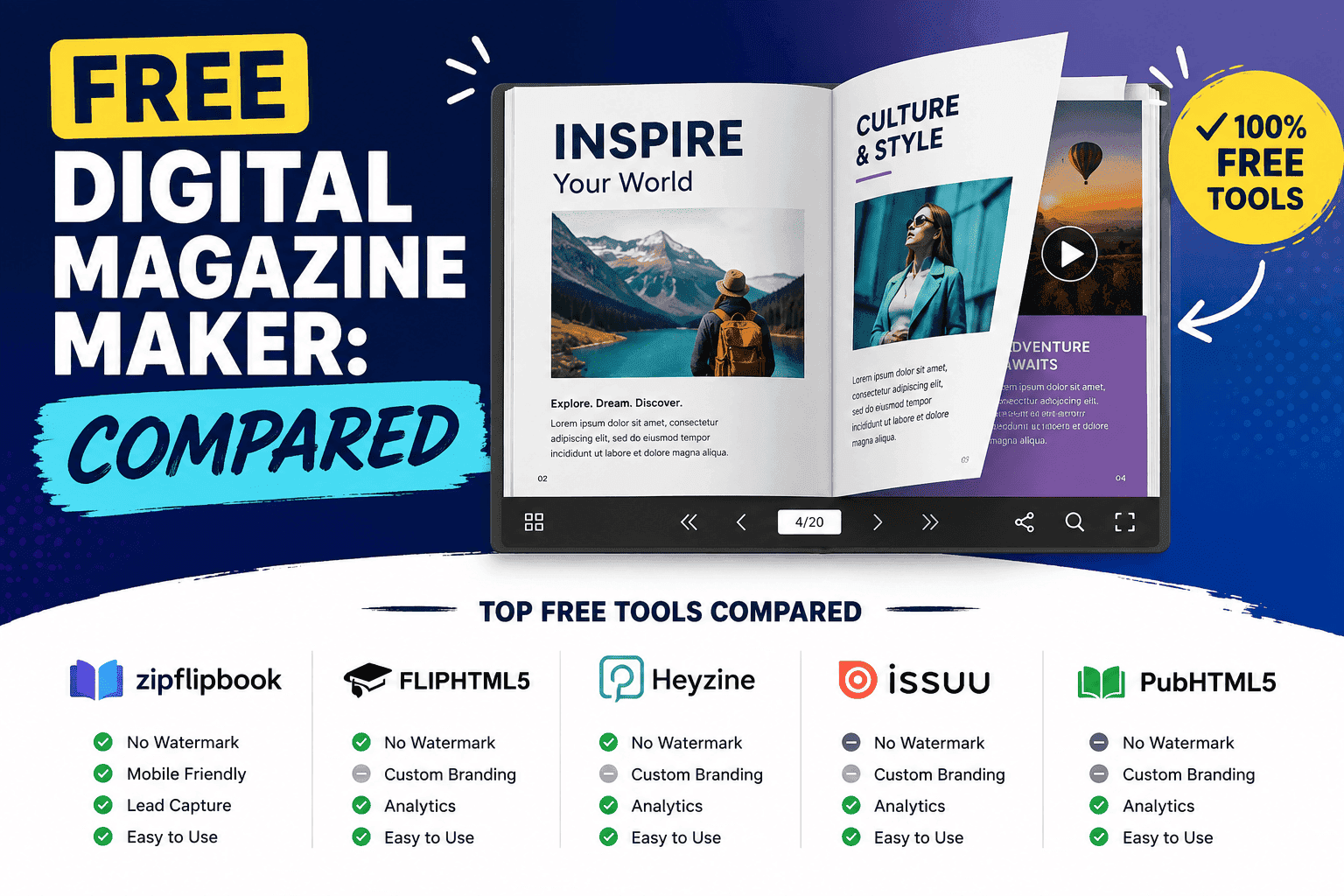
The first thing to check is the page limit — or the file size cap. Issuu's free plan tops out around 50 pages and 50MB per publication, which sounds generous until you're converting a 60-page catalog and have to split it into two links. FlipHTML5's free tier will convert your PDF, but the moment you want to add video, audio, or a hyperlink inside a page, that's locked behind a paid plan. Flipsnack caps free accounts at a handful of published flipbooks and slaps its own logo on the reader unless you upgrade.
The second thing is the watermark — and I mean the real kind. Not a subtle logo in the corner you can learn to ignore, but a persistent banner or footer that reads "made with [tool name]" on every single page your reader sees. If you're sending this to clients or investors, that banner is doing marketing for someone else's brand at the exact moment you're trying to build your own. I wrote a longer breakdown of which tools actually let you ship watermark-free for free in our roundup of the best free flip book makers without a watermark if you want the specifics tool by tool.
The third thing — and the one almost nobody checks until it's too late — is what happens to your data after someone opens the magazine. Most of these platforms give you a page count and call it analytics. That's not the same as knowing which page someone stopped on, whether they clicked your contact link, or whether they gave you their email before reading page one.
Issuu
Issuu is the name most people already know, which is exactly why it's the default a lot of people reach for and then regret. The free plan is genuinely fine for a hobby zine or a school project — upload a PDF, get a shareable flip-style link, done in five minutes. Where it gets frustrating is the moment your magazine needs to do anything commercial. Free publications on Issuu carry Issuu's own promotional content and, depending on settings, related-publication suggestions that can pull a reader straight off your page and into someone else's magazine. There's no built-in lead capture on the free tier, and the analytics you get are thin — impressions and reads, not behavior.
If Issuu is your starting point because it's familiar, it's worth reading through what a small business actually needs from an alternative before you commit a whole publishing workflow to it. I laid that comparison out in more detail in our piece on Issuu alternatives for small business.
FlipHTML5
FlipHTML5's strength is speed of conversion — drop in a PDF, PowerPoint, or Word doc and it spits out a page-flip version fast, and its free tier doesn't cap you as hard on page count as some competitors. The catch is that the free version is a static reading experience. No embedded video, no clickable hotspots, no lead form on a page — unless you're on a paid tier. It's also, in my experience, one of the more desktop-app-oriented tools in this list, which is a strange choice in 2026 when most people editing on the go expect everything to work cleanly in a browser tab.
FlipHTML5 is a fine choice if all you need is to make your PDF look like it flips. It's a poor choice if the magazine is meant to generate a lead, a sale, or a follow-up call.
Flipsnack
Flipsnack sits in a similar bracket to FlipHTML5 — solid page-flip mechanics, a genuinely nice-looking reader, and a free plan that's really just a trial dressed up as a tier. You get a small number of publications and page views before you hit a wall, and the free reader carries Flipsnack's own branding front and center. Its paid plans do have real interactivity and analytics — which tells you exactly where the company thinks the value lies: not in the free product.
I did a full head-to-head on this one because enough people were asking me directly whether to switch. If you're weighing Flipsnack specifically, the full Flipsnack vs ZipFlipbook comparison goes through pricing, watermarks, and lead capture side by side rather than me summarizing it twice here.
Canva
Canva keeps coming up in these lists because it's brilliant at the one thing it's actually built for: laying out a magazine that looks designed, not templated. If your priority is a beautiful cover, clean typography, and drag-and-drop control over every element, nothing on this list beats Canva for the design phase. But Canva makes documents, not interactive publications. Export a magazine from Canva and you get a static PDF or a set of images — no page-flip reader, no click tracking, no lead form, no embedded video that plays inline. It's a design tool dressed in a publishing tool's marketing copy.
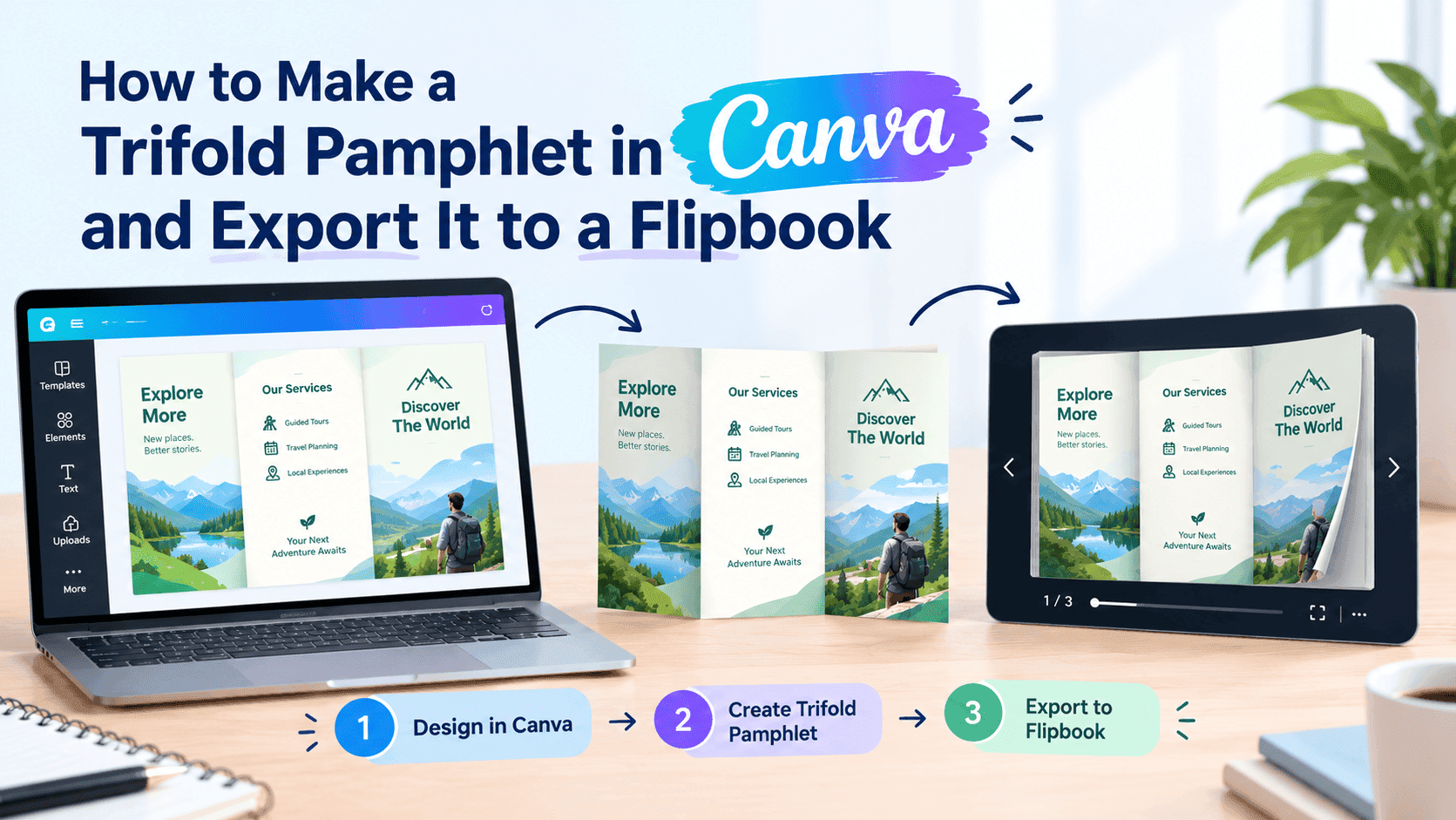
The workaround a lot of people land on — correctly — is designing in Canva and then converting the export into an actual interactive flipbook elsewhere. I wrote a step-by-step for exactly that combination in how to create a digital magazine in Word or Canva, and it's the workflow I'd actually recommend if design quality matters more to you than any single all-in-one platform.
Joomag
Joomag is the most feature-dense tool on this list — and also the one where "free" is doing the least honest work. The platform genuinely does have interactive widgets, decent analytics, and monetization tools like subscriptions and gated content — but nearly all of it sits behind paid tiers aimed at publishers running a real subscription business, not someone putting together a seasonal catalog or a single newsletter. The free tier exists mostly to get you into the funnel. If you're a hobbyist or small business testing the waters, you'll bump into the ceiling within your first publication.
Where ZipFlipbook fits
I'm not going to pretend I built ZipFlipbook because the market needed one more flipbook tool. I built it because I kept running into the same three walls on every platform above: watermarks I couldn't remove without paying, analytics that told me how many people opened a file but nothing about what they did once they were inside it, and lead capture that either didn't exist on the free tier or required bolting on a separate form tool.
ZipFlipbook converts a PDF into an interactive flipbook in your browser, no software to install, and the free tier doesn't stick our name across your reader's screen. You get an embed code and a shareable link, page-by-page analytics so you can see where readers actually stop or leave, and a lead capture form you can drop onto a specific page — the cover, the pricing page, wherever makes sense — without needing a separate email tool. You can also embed video and other media directly into pages, which is the exact feature most of the tools above hold back for their paid plans.
None of that makes ZipFlipbook the right tool for every job. If you're running a subscription magazine business with hundreds of paying readers, you probably want Joomag's monetization stack. If a static, beautifully typeset PDF is genuinely all you need, Canva alone will get you there faster. But if what you're making is a marketing magazine, a catalog, a proposal, or a newsletter — and the whole point is that someone reads it and then does something: clicks, buys, replies, books a call — that's the gap ZipFlipbook was built to close.
It's also worth knowing the difference between "digital magazine" and "just a PDF," because that distinction is where a lot of the tools above quietly cut corners. I go through that in more depth in digital magazine vs. PDF, and if lead generation specifically is your goal rather than just distribution, how to collect leads with PDFs using ZipFlipbook walks through the setup.
A quick side-by-side
Here is the image of the comparison table:
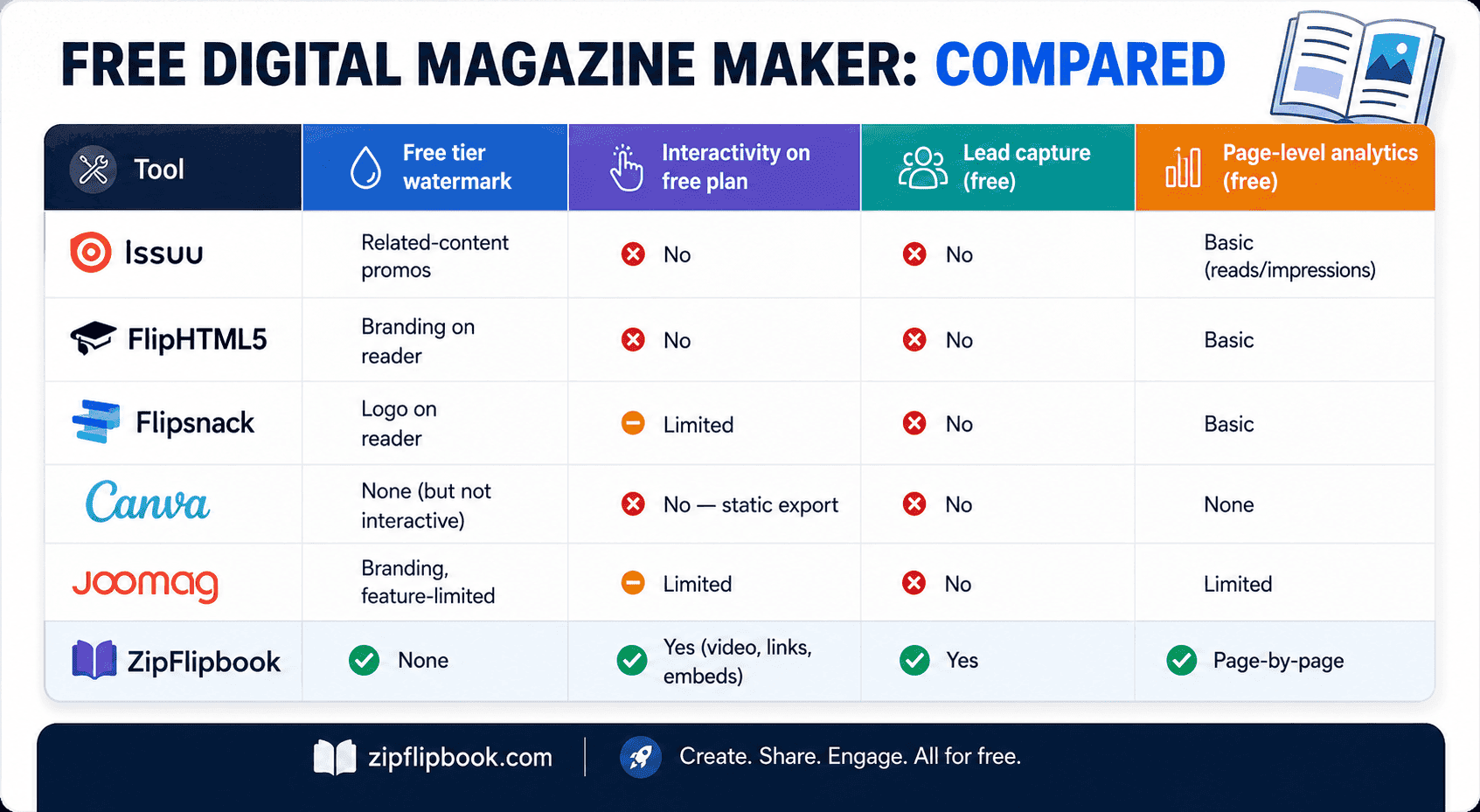
The honest way to pick one
If you want the fastest possible "make this PDF look nicer" and you'll never touch it again, FlipHTML5 or Issuu will do the job in ten minutes and cost you nothing but that watermark. If design is everything and interactivity doesn't matter, design in Canva and stop there. If you're building toward a real subscription publishing business, look hard at Joomag's paid tiers rather than fighting its free one.
But if the magazine you're making is meant to work for your business — to be shared, opened, read, and to turn a reader into a lead or a customer — you want a tool where analytics and lead capture aren't the reward for upgrading. That's the whole reason ZipFlipbook exists free the way it does. Upload a PDF, see what happens on the other end, and decide for yourself whether the numbers you get back are worth more than the ones you were getting before.